

 Student/Family Resources
Parents/Guardians Features
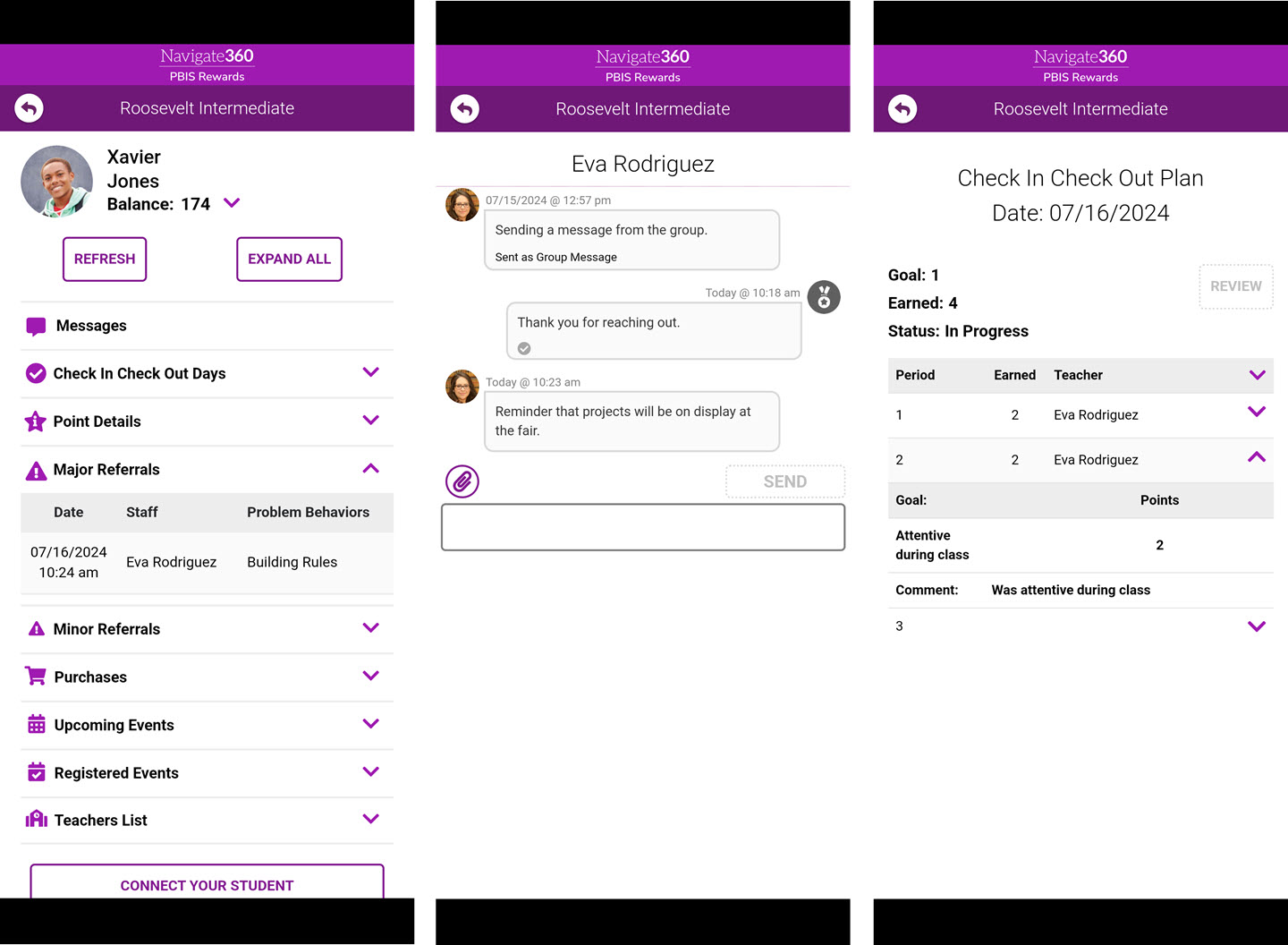
The PBIS Rewards Family App only allows access to student information specific to the QR code scanned. This information includes:
- Points balance
- Points details, including comments if applicable
- Receive and send messages with school staff
- Check-In/Check-Out Information
- Referrals – Date, Time, Staff, and Cause
- Major Referrals
- Minor Referrals
- Purchases
- Upcoming events
- Registered events
- Teacher List
The Family App can be translated into 16 different languages. The full list of available languages in the Family App include: Arabic, Chinese (Simplified), Filipino (Tagalog), French, German, Haitian Creole, Khmer, Korean, Myanmar (Burmese), Nepali, Russian, Somali, Spanish, Swahili, Tigrinya, and Vietnamese.
Pictured Below: PBIS Rewards Family App with Major Referral information (image on left), Messages to and from staff (image middle) and Check-In/Check-Out information (right).
If your school uses messaging, you may see a notice about Quiet Hours. The message will include the information about when messaging will be available again. IMPORTANT: When messaging is enabled, parents/guardians will be able to message school staff except for during Quiet Hours.